lws · linux window sizer
Put every window
exactly where you want it.
Linux Window Sizer places one window per action to a preset size and position — pixel-exact. Pop a mnemonic menu with a keystroke, reach for the tray, or script it from the command line. A Linux take on the classic Windows Sizer utility.
$ sudo apt install ./lws.deb
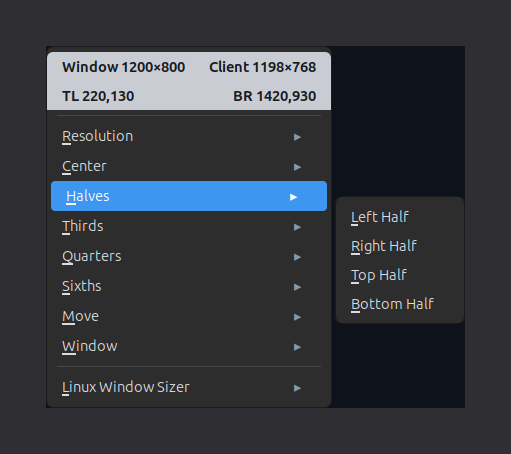
the active-window menu — live size readout + your presets, one keystroke away
three ways in
Reach your presets however you work.
The same library of presets, on three surfaces — a click, a keystroke, or a command. Use whichever is closest to hand.
System tray
An AppIndicator icon sits in your tray. Click it for the full, grouped menu of presets — and recolour its badge to match your panel.
Global hotkey
Bind one key in your desktop's Keyboard settings. It raises a mnemonic menu on the active window — type the underlined letter to place it, no mouse needed.
Command line
Script it or bind a direct action: lws --action left-half places the active window. Add --under-pointer to target the window under the cursor, or lws --list to see every preset.
The hotkey raises that active-window menu, topped with a live readout of the window's size and corners. The tray is the persistent, grouped view of the same preset library — and the CLI drives it all, for scripts and one-off placements.
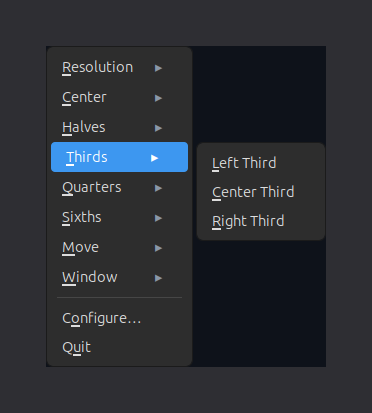
presets are the whole idea
A size, a position, a name.
Every preset is just that. Size in pixels or percent; position by any of nine anchors or an explicit, per-axis x/y from any corner. Move-only and resize-only are first-class. Group them into submenus, pin mnemonics, and edit it all in the dialog — or by hand in a plain TOML file.
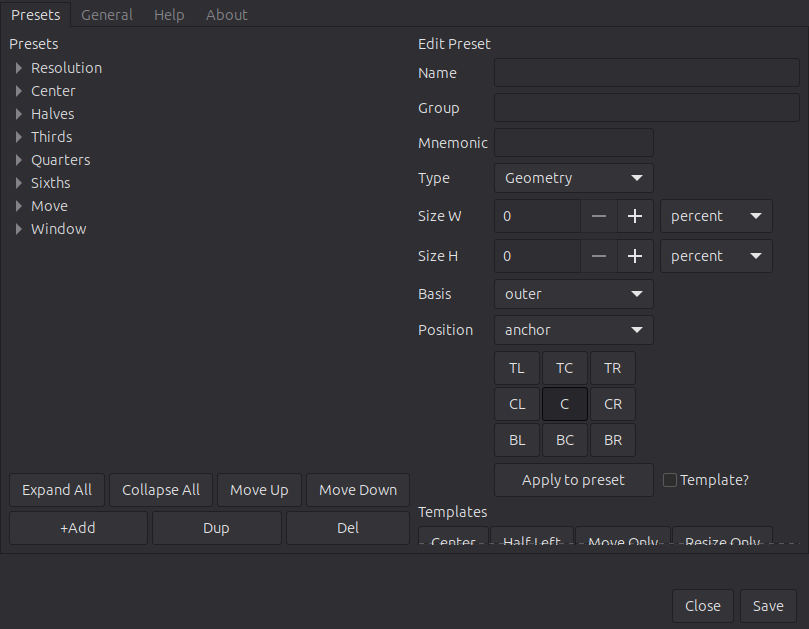
the configuration dialog — build and organise your preset library
install
One .deb, then apt.
Download the package and hand it to apt — GTK 3, the AppIndicator bindings, python3-xlib and the rest are pulled in automatically.
$ curl -O https://smisco.biz/lws/lws.deb
$ sudo apt install ./lws.deb
Requirements. An X11 desktop with an EWMH window manager — built and tested on Linux Mint / Cinnamon first; other desktops generally work. After installing, bind your trigger key in the desktop's Keyboard settings (the app shows you the exact command). Wayland is planned, behind the same backend interface.